SwitchBot’s new E Ink Weather Station is built to be a quiet, always-on hub for your home that shows weather and your schedule in one place. The company is pairing a large E ink display with a smart calendar, smart home controls, and low power use aimed at people who want fewer glowing screens but still want quick information at a glance.
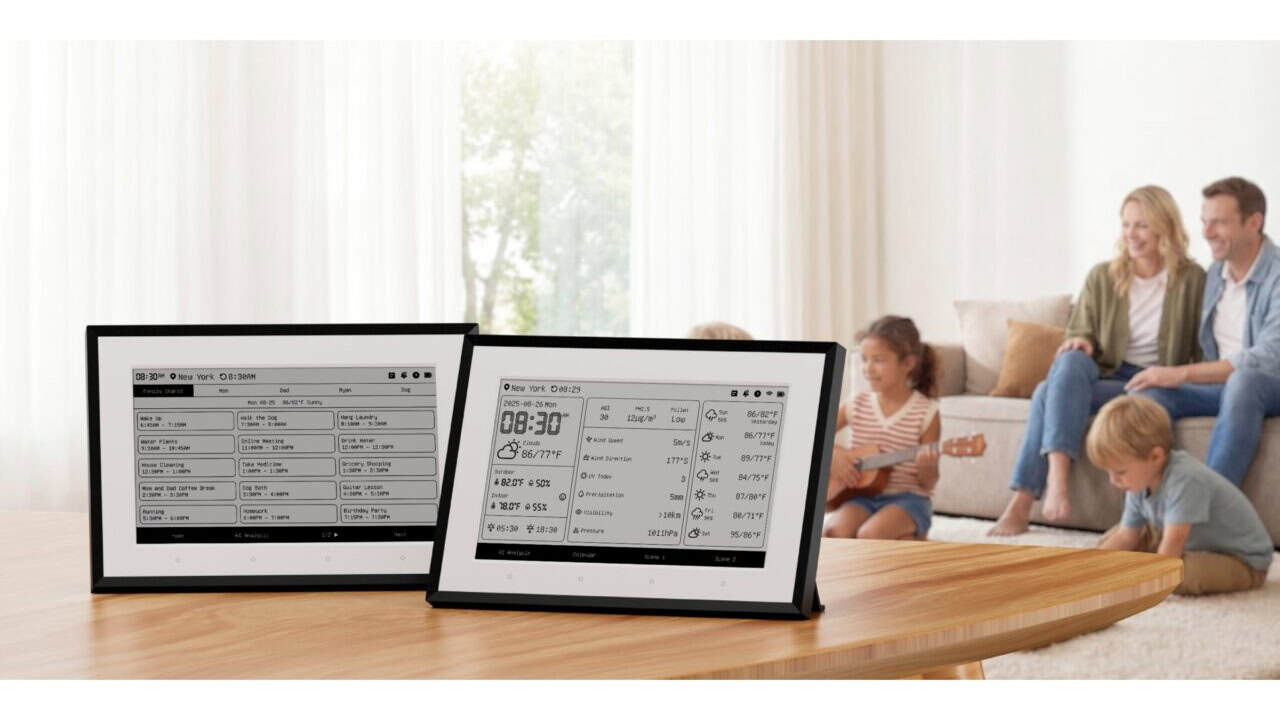
The Weather Station uses a 7.5‑inch E ink screen that looks more like paper than a tablet. E ink uses very little power and is easy to see from different angles, even in bright rooms. SwitchBot is pitching this as something you can hang on a wall or place on a shelf where everyone in the house can see the time, weather, and calendar without waking a phone or turning on a TV.
Always-on calendar and reminders
The standout feature is the built-in smart calendar, which pulls events from popular calendar apps through the SwitchBot app. The display can show a mix of date, time, upcoming events, and a daily schedule layout so you can see your day at a glance. Users can customize which calendars show up, how many days ahead to display, and which widgets appear on the main screen.
The calendar also ties into reminders and alerts. For example, you can have it show an upcoming meeting along with the current weather and indoor temperature, or display travel plans and flight times next to outdoor conditions. SwitchBot is aiming this at families and busy households where people want a shared view of appointments and plans in a central spot like the kitchen or hallway.
Weather details inside and out
Beyond scheduling, the Weather Station focuses on both indoor and outdoor climate. The main unit can show outdoor temperature, humidity, and general weather conditions pulled from online sources. For indoor data, it can pair with SwitchBot’s own temperature and humidity sensors so you can see how comfortable each room is.
The display layout can be adjusted so some users might choose a big clock with a small forecast, while others might want a detailed 3‑day forecast and more sensor data. The E ink screen helps keep all this visible around the clock without a bright glow, which makes it more suited for bedrooms or low‑light spaces than a regular LCD tablet.
Smart home control and integrations
The Weather Station also works as a basic smart home control panel within the SwitchBot ecosystem. From the screen, users can trigger scenes or shortcuts they set up in the SwitchBot app, such as turning on a heater, adjusting a smart curtain, or switching off lights. It connects over Wi‑Fi and can talk to other SwitchBot devices already in the home.
It also works with major voice assistants through the SwitchBot platform. That means you can tie calendar events and weather conditions to automations, such as turning on a dehumidifier when humidity rises or adjusting routines based on time of day. While it is not meant to replace a full smart display with speakers and video, it gives a simple control point focused on information and quick actions.
Low power use and simple design
SwitchBot is leaning on E ink mainly for low power draw and readability. The screen only uses noticeable power when the image changes, so the device can stay on all day without much energy use. The black‑and‑white display is also meant to be less distracting than a bright color screen, which may appeal to people trying to cut down on glowing gadgets in living spaces.
The hardware itself follows a clean, flat design aimed at blending into different rooms. It can sit on a desk or mount to a wall, and the adjustable layouts let you turn it into a wall calendar, bedside clock, or weather board depending on your needs. For people already using SwitchBot’s smart home products or those who just want a shared family calendar and weather screen that does not feel like a tablet, the E Ink Weather Station is positioned as a focused, always-ready option.
View the original press release.