These 10 copy‑paste ChatGPT prompts save you hours by handling chores like planning meals, summarizing long emails, and drafting replies for you. Each one is a simple fill‑in‑the‑blank template you can reuse for school, work, travel, or home. Keep reading to grab the prompts and start getting your time back.
Plan a Week of Dinners From What’s in Your Fridge

Meal planning is the chore this prompt kills first. Drop in a skeleton like: “You are my meal planner. Here’s what’s in my fridge: [list]. Make a 7‑day dinner plan with a shopping list and 30‑minute recipes,” swap in what is actually on your shelves, and a 45‑minute Sunday brain drain becomes a quick scan-and-go list, one of the easiest everyday ChatGPT wins you can grab.You can push the same skeleton further with rules like “use up the chicken before Thursday,” “make two nights vegetarian,” or “keep dinners under $5 a serving,” and it will rework the week around them. Ask for the shopping list grouped by store aisle and leftovers folded into the next day’s lunches, and you get a plan you will actually follow instead of a pile of open recipe tabs.
Turn a Long Email Thread Into Action Items

One of the fastest wins is a copy‑paste prompt that turns a 40‑reply email thread into a clean task list in under two minutes. You just paste the whole Gmail or Outlook thread into ChatGPT and use a skeleton like: “Here is an email thread. 1) List every clear action item, 2) say who owns it, 3) include any due dates, 4) flag anything that needs a decision. Thread: [paste emails].” ChatGPT then spits out a checklist with bullet points like “Owner: Sarah, Task: Send Q3 budget in Excel, Due: Friday,” which is way easier to copy into Asana, Todoist, or a simple Google Doc than skimming 20 screens of messages.This one prompt can save you 15 to 20 minutes every time a project email blows up, especially when there are multiple CCs and vague requests hidden in the middle of long replies. You can tweak it with lines like “Only include tasks that someone must do” or “Group tasks by person” to match how you manage work. The main goal is simple: you stop re-reading the same emails three times and let ChatGPT do the hunting for who needs to do what by when.
Draft a Tricky Reply in the Right Tone

Copy-paste prompts that draft tricky replies in the right tone can save you 10 to 20 minutes every time you stare at your inbox stuck on what to say. You drop in a skeleton like: “You are my writing assistant. Draft a reply to this message: [paste message]. My goal is: [explain what you want]. The tone should be: [e.g., polite but firm / friendly and casual / apologetic]. Include: [any points you must cover]. Avoid: [topics or phrases you do not want],” then let ChatGPT write a first draft. You can use it for touchy work emails, awkward texts to a roommate, or a careful reply to a teacher or boss, then tweak a few words before sending. Over a week of back-and-forth emails and messages, that one prompt can easily give you back an hour or more of “ugh, how do I say this?” time.
Plan a Weekend Trip Itinerary

A weekend trip is where a fill-in-the-blank prompt really earns its keep. You might use: “You are my travel planner. Plan a detailed 2‑day itinerary for [city] for [number] adults and [number] kids, from [date] to [date]. We like [interests], our budget is about [$X] per day, and we’re staying at [hotel/area]. Include morning, afternoon, and evening plans with walking times, restaurant suggestions with price range, and a short packing list.” That one prompt can spit out a full Friday‑to‑Sunday plan in under a minute, instead of you spending 1 to 2 hours bouncing between Google Maps, Yelp, and reviews.Once the draft itinerary lands, treat it like a first pass from a travel agent. Ask follow-ups like “swap Saturday afternoon for something indoors in case it rains,” “add a kid-friendly lunch spot near the museum,” or “cut the budget by $100 and show me what changes,” and the plan reshuffles in seconds. Keep personal details light, since there are things you should never share with a chatbot, and double-check hours and prices before you book, because ChatGPT’s suggestions can be out of date.
Turn Rough Notes Into a Polished Document

Copy-paste prompts that turn rough notes into a polished document save you hours by doing the organizing, rewriting, and formatting for you. For example, you can drop in something like: “Turn these notes into a clear, well-structured document with an intro, sections, and a short conclusion. Keep it in my voice, remove repetition, and flag any missing info with [ADD DETAIL]: [paste your messy notes here].” ChatGPT then turns a chaotic bullet list, meeting transcript, or brain dump into a clean Google Docs or Microsoft Word–ready draft in minutes instead of the 1–2 hours you might spend rewriting by hand.This type of prompt works across a bunch of chores, from turning Zoom call notes into a project summary to organizing class notes into a study guide or turning a travel brainstorm into a shareable weekend itinerary. You can add specific format requests like “Use H2 and H3 headings,” “Add a short TL;DR at the top,” or “Keep it under 800 words,” so the output drops straight into your blog, email, or report. For most people, this one prompt becomes a daily go-to anytime you have a screen full of messy text and need it turned into something you could actually send or publish.
Build a Study Guide From Any Topic

Studying gets faster when you make ChatGPT your study coach with a template like: “You are my study coach. Turn this topic into a study guide with sections: key terms, short definitions, must-know formulas, 10 quiz questions with answers, and a 15‑minute review plan. Topic: [PASTE TOPIC OR NOTES].” You drop in your textbook chapter, lecture notes, or even a long Wikipedia page, and ChatGPT spits out organized bullet points, definitions, and practice questions you can actually cram from. For a 30‑page PDF that might take you two hours to outline by hand, this kind of prompt can cut the setup time to about 10 minutes, so you spend your time learning instead of formatting.
Make a Comparison Table of Your Options
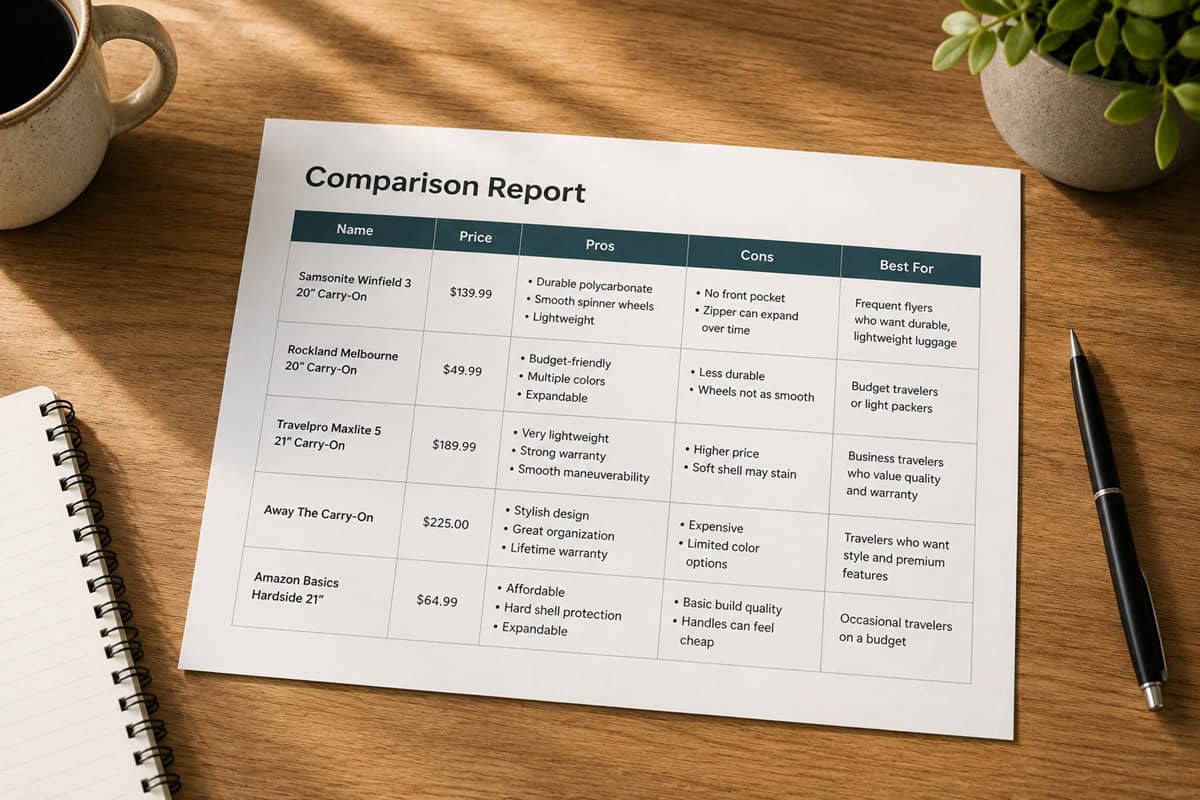
Copy-paste this prompt into ChatGPT and you can turn a messy list of choices into a clean comparison table in under two minutes: “Make a table comparing these options: [PASTE OPTIONS]. Use columns for name, price, pros, cons, and best for, and keep rows short and scannable.” You can dump in Amazon product links, laptop model names, or three preschool options, and ChatGPT will lay them out in a grid you can skim in one glance instead of clicking back and forth for an hour.This kind of prompt is perfect for everyday decisions like “Which of these 6 carry-on suitcases under $200 should I buy?” or “Compare these 4 meal kit plans based on price per serving and delivery days.” The output is a simple table you can copy straight into Google Docs, Excel, or Notion, and you can tweak columns by adding things like “warranty length,” “subscription cost per month,” or “travel time from home” depending on what you care about most.
Break a Messy Budget Into Clear Categories
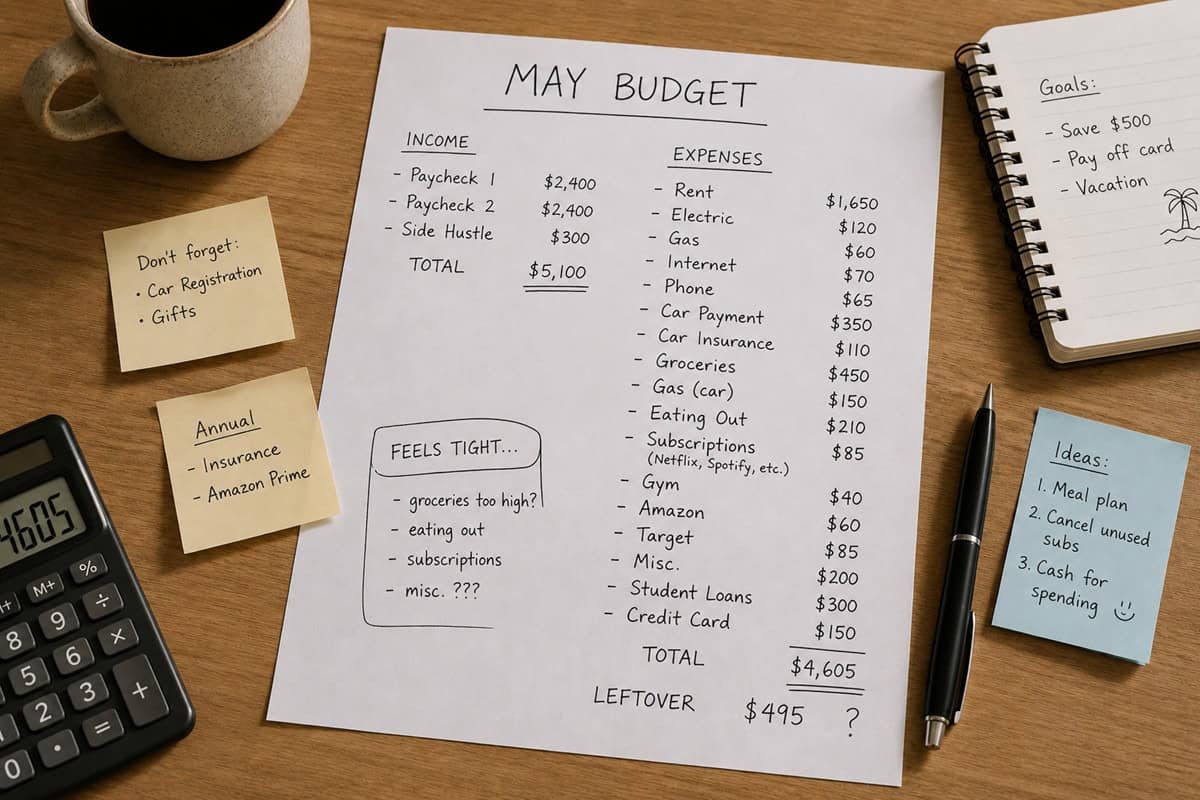
A single copy-paste budget prompt can turn a messy list of bills into a clear monthly breakdown in under two minutes. Use a skeleton like: “You are a personal finance assistant. Break this list of income and expenses into a simple monthly budget with categories, totals, and a one-sentence takeaway for each category. Income: [paste list]. Expenses: [paste list]. Show: 1) a table with Category, Items, Amount; 2) total income vs total spending; 3) how much is left or how much I’m overspending; 4) three ideas to fix any gap.” Paste in raw bank exports, Venmo descriptions, and subscriptions, and let ChatGPT do the sorting you would normally spend 30 to 45 minutes doing in a spreadsheet.
Fill a Rainy Day With Kid-Friendly Activities

A ready-made “rainy-day fun” prompt saves you at least 30 minutes of Googling, pinning, and scrolling when your kids are stuck inside and bored. Use a skeleton like: “You are an activity planner for kids. Give me [NUMBER] screen-free, indoor activities for kids aged [AGE RANGE], using supplies like [LIST WHAT YOU HAVE AT HOME], for a rainy day that lasts about [NUMBER] hours. Put them in a table with columns: activity name, time needed, mess level (1–5), clear step-by-step instructions, and what I should prepare in advance.” Paste that in, swap in your kids’ ages and the supplies you actually have, and you instantly get a custom list that covers your whole afternoon without you scrambling for ideas.
Decode a Confusing Bill, Contract, or Form

A dense medical bill, lease, or insurance statement is exactly the kind of thing ChatGPT can translate in seconds. Paste in the confusing part and use a skeleton like: “Explain this [bill/contract/form] in plain English. List each charge or clause in a simple table, flag anything unusual or worth questioning, and give me 3 questions to ask before I pay or sign: [paste text].” Instead of squinting at fine print or Googling one term at a time, you get a plain-language breakdown you can actually act on.This is a real time-saver for the paperwork everyone dreads: a surprise hospital EOB, a phone contract’s early-termination fine print, a rental agreement, or a terms-of-service update. Keep account numbers and other sensitive details out of the paste, and double-check anything that affects money or legal rights against the original document, using the summary to decide what to question rather than as the final word.
Summary
These 10 copy‑paste ChatGPT prompts save you hours by turning chores you avoid into quick 30‑second jobs. Pick two prompts you’ll use the most this week, like the email action‑item list and the tricky‑reply helper, and paste their skeletons into a note where you can grab them fast. Each time you catch yourself thinking “I’ll deal with this later,” drop in the matching prompt, swap in your details, and let ChatGPT handle the first draft so you can just review and move on.