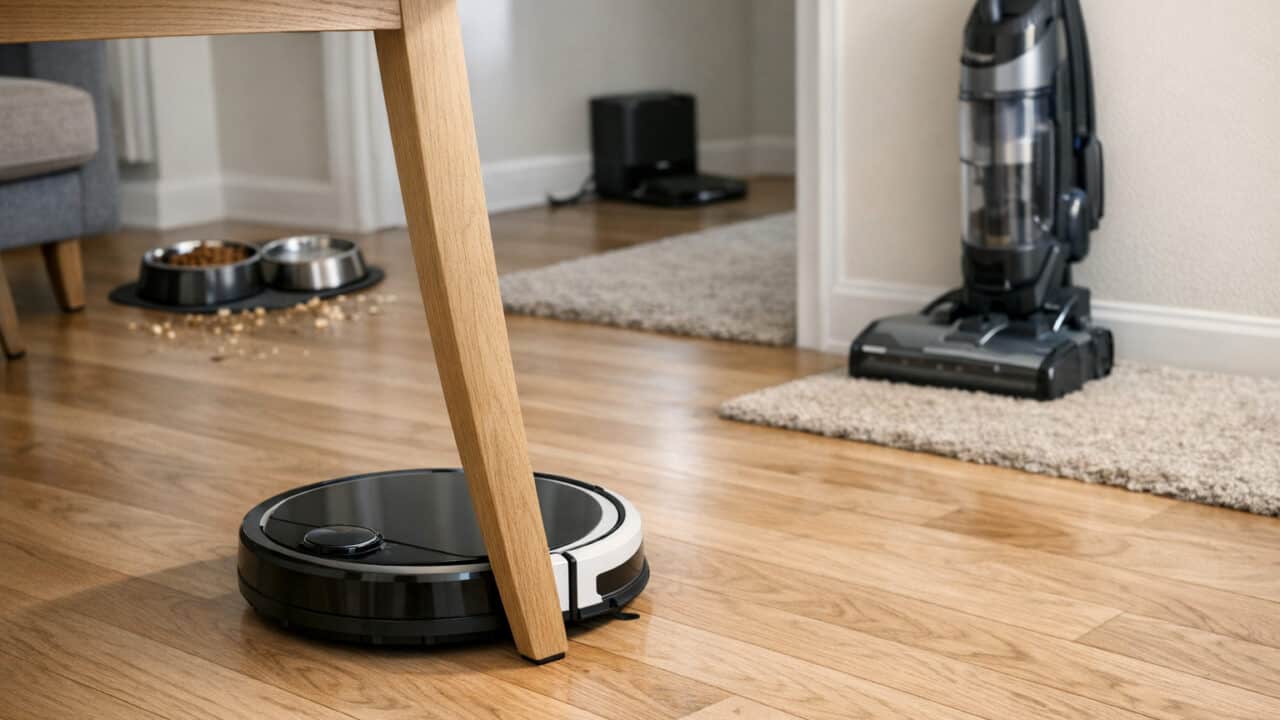
Buying your first robot vacuum is much easier when you know what it can do well and where it falls short. A good robot can keep up with daily dust and crumbs, but it will not replace a regular upright or stick vacuum. From basic bump-and-go models to higher-end lidar robots, the best choice depends on your floors, pets, and home layout. The rest of this guide walks through what actually matters before you spend the money.
A robot vacuum can handle most daily dust and crumbs on hard floors and low-pile rugs, but you still need an upright or stick vacuum for deep cleaning and tricky areas like stairs, corners, and upholstery.
What robot vacuums handle well: hard floors, dust, crumbs, and day-to-day upkeep
A typical robot vacuum is good for keeping hard floors free of everyday dust, crumbs, and pet hair without much thought from you. Most robots use spinning side brushes and a center brush roll to pull dirt into a suction opening, which works well on hardwood, tile, and vinyl. Many models let you schedule cleanings, so the robot can run once or twice a day while you are at work or sleeping.
Some robot vacuums, such as the Roborock Qrevo Edge 3 Pro, can vacuum and mop hard floors in one run, which helps with light spills and sticky spots. These robot vacuums are best at “maintenance cleaning,” meaning they pick up the constant layer of dust and crumbs that shows up every day around the kitchen and entryway. If you have pets that shed, a robot vacuum can keep fur from building up between deeper cleanings with an upright or stick vacuum.
Robot vacuums with self-emptying docks can go weeks before you need to touch the dust bin. Many of these docks hold roughly 30 to 90 days of debris, depending on how often you run the robot and how dusty your home is. This makes it easier to stick with a daily cleaning schedule, so your floors look cleaner even if you do not pull out a big vacuum very often.
Where uprights and stick vacuums still win
An upright or stick vacuum still does a better job than a robot vacuum on deep carpet cleaning, corners, stairs, and quick spot messes. Most robot vacuums struggle to pull dirt and sand from thick rugs and wall-to-wall carpet the way a full-size upright can. Upright and stick vacuums usually have stronger suction and powered brush rolls that dig deeper into carpet fibers.
Robots are round and sit low to the ground, so they have trouble getting deep into corners, along baseboards, and around tight chair legs. Uprights and cordless sticks often come with tools like crevice nozzles, dusting brushes, and mini motorized heads that let you clean stairs, upholstery, car interiors, and ceiling corners. A quick pass with a stick vacuum on stairs or couch cushions will pick up more targeted dirt than a robot vacuum can reach on its own.
Robot vacuums also are not great for urgent messes such as a spilled cereal box, potting soil, or craft glitter on the floor. You will grab a handheld or stick vacuum for those “right now” cleanups, because you can point the vacuum exactly where the mess is and see when it is gone. A robot vacuum is best seen as your daily helper, while an upright or stick vacuum is still the tool you need for deep clean days and awkward spots.
The right robot vacuum depends on your floors, pets, and home layout
Vacuum-only vs vacuum-and-mop combos
The choice between vacuum-only and vacuum-and-mop robot vacuums comes down to your floor types, how messy your home is, and how much hands-on work you want. Vacuum-only models tend to be simpler, cheaper, and better at deep carpet cleaning, especially if you have a lot of rugs or thick carpet. Lower-priced options start in the budget range, while high-end self-emptying versions can cost several times more. If your home is mostly carpet, or you are already happy with your regular mop, a vacuum-only robot is usually the better value.
Vacuum-and-mop combos make more sense in homes with lots of hard floors and light daily messes. These robots can vacuum and mop in one run, and some can lift their mop pads when crossing rugs so they do not soak carpet. You trade some cleaning power and simplicity for that extra convenience, and you will need to fill a clean water tank and empty a dirty one. If you have pets that leave muddy paw prints or kids who spill often, a combo model can save you from grabbing a manual mop every day.
Navigation and mapping matter more than most shoppers expect because they decide whether the robot finishes the job or just wanders around missing spots. Entry-level bump-and-go robots randomly change direction when they hit furniture, which can mean a long, noisy run just to cover a small apartment. Mid-range models use gyroscope-based or basic camera navigation to follow straighter lines and remember some of your room layout. High-end robots with lidar or advanced cameras map your home into rooms and can usually clean an average floor more quickly and with fewer missed areas.
Good mapping lets you draw room boundaries, send the robot to clean just the kitchen, or set “clean twice” passes in high-traffic areas. Obstacle detection, like the PrecisionVision AI on the iRobot Roomba Max 875 Combo, can even recognize common floor obstacles such as shoes and cords, which helps avoid tangles. Some lidar-based robots can struggle with mirrors or very shiny floors, while camera-only robots can get confused in low light. If you want to run the vacuum at night or while you are out, paying more for smarter mapping is usually worth it.
How your home layout, floors, and pets change your choice
Multi-floor homes, no-go zones, thresholds, dark floors, high-pile rugs, and pet hair can make or break your robot vacuum experience because they control where the robot can go and how well it actually cleans. If you have more than one level, look for models that store multiple maps so you can carry the robot upstairs without redoing the layout every time. Most robots can climb thresholds and transitions up to about 0.6 inches, a few 2026 flagships with lifting chassis manage single steps of roughly 1.4 to 1.8 inches and stacked double-layer thresholds of up to about 3.5 inches, but very tall transitions or uneven stone can stop them cold. Dark or black floors can confuse some infrared cliff sensors, making the robot “think” there is a drop-off and refuse to clean those spots.
No-go zones and virtual walls in many apps save you from laying magnetic strips or closing doors every time. These tools let you block pet water bowls, cords, or areas with fringe rugs that always get sucked up. If you have high-pile or shag rugs, you will want stronger suction and a brush roll that will not choke on long fibers. For homes with heavy shedders, models with self-empty bases and tangle-resistant brush rolls can be worth the higher upfront cost, because emptying a small bin full of pet hair every day gets old fast.
The real cost includes the dock, the app, and ongoing upkeep
Self-empty docks and all-in-one stations cut hands-on work but add size, noise, and extra parts to buy
Self-empty docks and all-in-one stations save you time, but they take more space, make more noise, and need extra bags and parts over time. A basic robot vacuum that you empty by hand only needs space for the round vacuum and a low dock. A self-empty dock adds a tall tower that may not fit under a console or shelf. All-in-one stations that wash mop pads and refill water are closer in size to a small end table.
These stations also get loud when they pull debris from the robot into the dock. That burst of sound can be close to a hair dryer for 10 to 30 seconds. You can often schedule or mute auto-empty cycles in the app, but you may still need to plan around naps and calls. Long term, you will buy dust bags for the dock and, on wash stations, deal with clean and dirty water tanks plus mop pads. Dock dust bags usually come in multi-packs and may need to be replaced every few months in a busy home.
On the plus side, a self-empty dock can stretch how often you handle the robot from every run to every few weeks, depending on your floors and pets. For some people, that tradeoff is worth paying extra on top of the vacuum price. For others, especially in small apartments with tight storage, a basic dock or even a simple charging cable makes more sense than a large tower you bump into every day.
Apps, cloud features, and cameras affect setup, privacy, and how much control you have
App features, cloud connections, and built-in cameras change how you set up your robot vacuum, what data it sends out of your home, and how precisely you can control cleaning. Wi-Fi robots like the Roborock Qrevo Edge 3 Pro or iRobot Roomba Max 875 Combo use apps to draw maps, name rooms, set no-go zones, and schedule runs. That app control is great when you want to clean just the kitchen or run a quick pass before guests show up. But it also means you are creating an account, agreeing to terms, and sending some home layout and usage data to a company’s servers.
Ownership can change too: iRobot went through Chapter 11 in late 2025 and has been owned by Picea since January 2026, with a separate US subsidiary, iRobot Safe, set up to protect US customer data.
Some robots use cameras for navigation or object detection, such as front-facing “obstacle avoidance” cameras that spot shoes and cords. Those cameras can be pointed into bedrooms and bathrooms, and some features, like “pet monitoring,” stream live video to your phone. Brands usually say that mapping data and navigation images are processed in specific ways, but privacy policies and settings vary, so you should read the permissions screens during setup instead of tapping through. If you do not want cameras inside your home at all, look for lidar-based robots without visible cameras and turn off any optional cloud features you do not need.
App design also plays a big role in how much frustration you deal with on day one. A clear app that walks you through Wi-Fi setup, docking, and the first mapping run can get you going in about 15 to 30 minutes. A clunky app that drops the connection or hides settings behind menus may leave you crouched by your router. If you or someone else in the house is not comfortable with smartphone apps, a simpler robot with on-device buttons and a remote may be a better fit than one that leans on cloud accounts and frequent updates.
Budget tiers change what you get, and some homes are better off skipping a robot vacuum
Your budget level changes not only how well a robot vacuum cleans, but also whether it works at all in your space. In the lowest price range, you are usually looking at random-bounce robots that roam until the battery runs low and then head back to charge. These cheaper models can help with daily crumbs in open layouts, but they struggle in cluttered rooms, multi-room spaces, and thick rugs. Many also skip features like smart mapping, virtual no-go lines, and self-empty docks, though a growing number of entry-level models now include them.
In the midrange, you start to see lidar or camera mapping, room-by-room cleaning, stronger suction, and optional self-empty bases. This is where many “set it and forget it” options live, like newer Roomba Plus models or midrange Roborock and Ecovacs models. If you have a mix of hard floors and low to medium pile carpet, moderate clutter, and Wi-Fi, this tier can make a real dent in your weekly sweeping and vacuuming. Above that, premium hybrid models add mopping, heated pad drying, and more powerful obstacle detection, but you are paying closer to the cost of a nice upright plus a stick vacuum together.
Some homes are not good matches for robot vacuums, no matter the price. Very cluttered floors with lots of cords, toys, and uneven thresholds will trap almost any robot multiple times per run. If you have thick, shaggy carpet in most rooms, or lots of narrow hallways and steps, a regular corded or cordless vacuum may be faster and less annoying. In those cases, your money may be better spent on a strong stick vacuum and a few storage baskets instead of a robot you constantly rescue.
Frequently asked questions
What features should I look for in a robot vacuum if I have pets and a lot of hair on the floor?
If you have pets and a lot of hair on the floor, look for a robot vacuum with strong suction, a tangle-resistant rubber or silicone brush, and a large dustbin. A self-emptying dock, fine-particle filter, and good edge cleaning also help with pet hair and dander, and app controls let you schedule extra runs during heavy shedding seasons.
How often do I need to empty the dustbin and clean the brushes on a robot vacuum?
Plan to empty the dustbin on a robot vacuum after every one or two cleaning runs and clean the brushes about once a week in a typical home. In homes with pets, long hair, or lots of debris, you may need to empty the dustbin after every run and clean the brushes two or three times a week to keep suction strong and prevent tangles.
Do robot vacuums work on both carpet and hardwood without getting stuck or damaging the floor?
Most robot vacuums are designed to work on both carpet and hardwood without getting stuck or scratching the floor. Beginner-friendly models usually have rubber or soft wheels, height sensors, and brush designs that adjust to different surfaces. Very thick shag rugs, high thresholds, or loose cords can still trap the robot, so you may need to pick up those items or block off problem spots in the app.
How long does the battery usually last on a robot vacuum, and how long does it take to recharge?
The battery on a typical robot vacuum usually runs for about 60 to 120 minutes per charge, and recharging usually takes around 3 to 5 hours. Many newer midrange and premium robot vacuums have a “recharge and resume” feature, so the robot vacuum returns to its dock to charge and then automatically goes back out to finish the job.
Will a robot vacuum map my house and remember rooms, or does it just move around randomly?
Most newer mid-range and high-end robot vacuums will map your home and remember rooms, while many cheaper models just move around randomly using “bump and go” navigation. Robot vacuums with lidar or camera-based mapping can show a floorplan in the app, let you label rooms, and set no-go zones, while basic random-navigation models usually just clean until the battery runs low and cannot target specific rooms.
Final thoughts
The most important thing to remember is that a robot vacuum is a daily helper for dust and crumbs, not a full replacement for a regular upright or stick vacuum. Before you buy, match the robot to your home: look at your floor types, how much pet hair you have, your thresholds and rugs, and whether you want simple bump-and-go or smart mapping with no-go zones. Then decide if you really need extras like a self-empty dock, mopping, and app control, or if a simpler, cheaper model fits your space and budget better.