Homey is adding a new Device Updates feature that lets you update many Matter, Z-Wave, and Zigbee devices straight from the Homey app instead of juggling different manufacturer apps and hubs. This applies to security patches, bug fixes, and performance updates across a wide range of supported brands.
Why Your Smart Home Devices Need Firmware Updates
Smart home gear is basically tiny computers, and they need software updates just like phones and laptops. Before this change, updating a device often meant reopening the brand’s own app, reconnecting an old hub, or running a separate update tool. That setup made it easy to forget or skip updates, especially for things like motion sensors and in-wall switches that you rarely think about once they are installed. Pulling those updates into Homey makes regular maintenance more realistic for normal users, not just enthusiasts.
What Device Updates Actually Does
With Device Updates, you can trigger updates for compatible Matter lights, Z-Wave locks, and Zigbee sensors directly from Homey’s interface. A typical use case would be installing a new firmware version on a smart lock that closes a security hole, or applying a stability update that stops a sensor from dropping off the network. The level of control is still per device, so you can decide when to update certain products instead of flipping everything at once.
Which Homey Products Support It
The feature is available across multiple Homey products, including Homey Cloud, Homey Pro (2023 to 2026), Homey Pro mini, and Homey Self-Hosted Server. For people who already run most of their home through Homey, this keeps updates inside the ecosystem they already use every day. It also helps users who run a mix of brands under one roof, since you can now rely on Homey to manage firmware for different vendors without tracking each one separately.
Where the Firmware Comes From
Homey is not pushing the same update channel for every protocol. Z-Wave and Zigbee updates move through the individual Homey apps that add support for each brand or device line. That means the app’s developer and the original manufacturer both decide which updates show up in Homey and when. For Matter devices, Homey pulls updates directly from the Connectivity Standards Alliance’s Distributed Compliance Ledger, which is the shared registry that lists approved Matter firmware and where to download it.
Which Brands Work at Launch
Support at launch covers a range of well known smart home brands, and more partners are expected to join over time. Examples include IKEA, Aeotec, Inovelli, Zooz, and ThirdReality. These are all brands with popular products like motion sensors, switches, dimmers, and plugs that often benefit from small but important fixes.
Why You Might Not See an Update
If you look for an update and do not see one, there are a few common reasons. For Z-Wave and Zigbee gear, the device’s Homey app might not offer firmware updates yet, even if the brand has released new software elsewhere. In other cases, the manufacturer might not have published the update to the channel Homey uses, so there is nothing for Homey to download. That gap usually closes when either the app developer adds support or, for Matter gear, the manufacturer publishes the new firmware to the Distributed Compliance Ledger. One case never closes, though: devices you paired using Homey’s basic Z-Wave or Zigbee driver rather than a brand-specific app do not receive updates at all.
What You Need and How to Start an Update
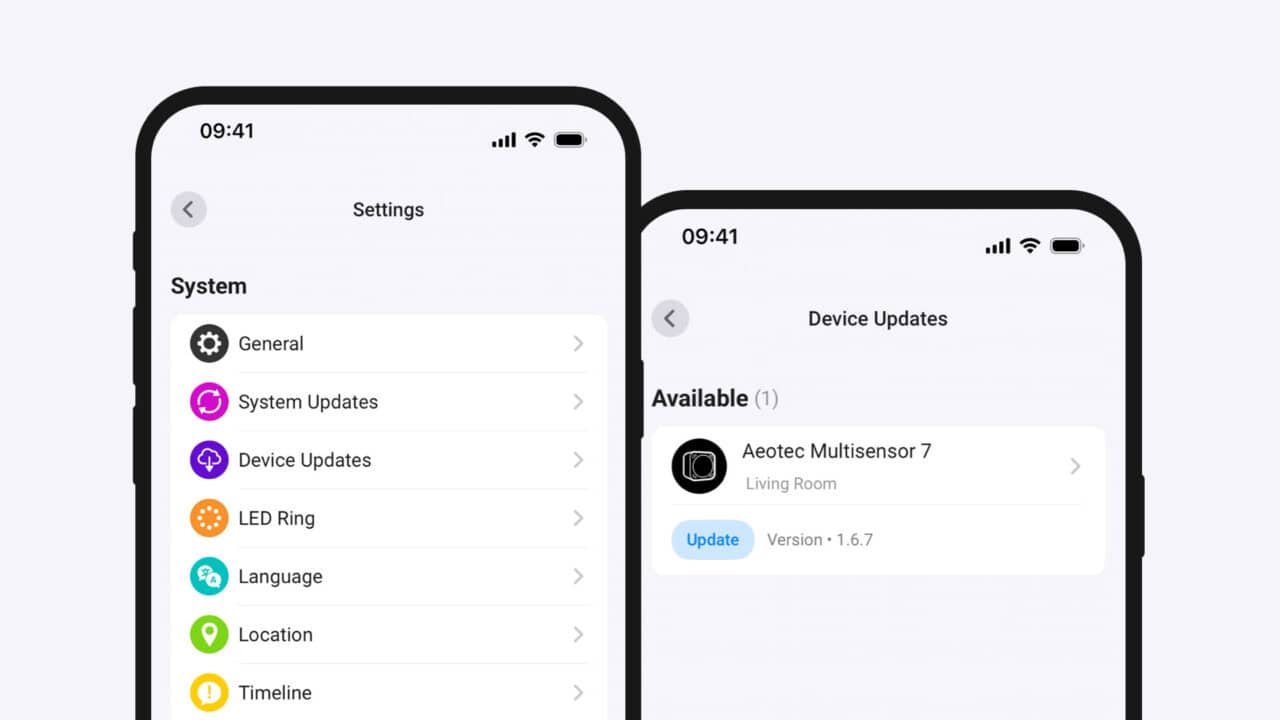
You manage Device Updates inside the Homey Mobile App or Homey Web App under More (…) → Settings → Device Updates, where you can see and start available updates, queueing several devices so Homey handles them one at a time. Battery-powered devices that sleep to save power cannot be queued, though, and need waking manually before their update starts. You can also open a specific device, go to its settings, and tap Maintenance to see if that particular product has an update waiting. If you run a Homey Pro or Self-Hosted Server, it needs to be on version 13.2.0 or later, and the Homey Mobile App on version 9.10.0 or later. Once your setup meets those version requirements, Homey takes care of the different update paths behind the scenes.
View the original press release.