Alexa+ is now included at no extra cost on compatible Fire TV devices across the U.S., and it does not matter whether you have Prime. Amazon began the rollout on August 19, 2026, and eligible devices upgrade themselves, with no app to download and nothing to activate. What changes is the built-in voice control: instead of strict commands and exact titles, you can talk to your TV the way you’d talk to a friend about what you want to watch or do at home.
Amazon says customers with Alexa+ on Fire TV are talking to it nearly twice as much as they did with the original Alexa. A big reason is that Alexa+ understands context and preferences better, so follow-up questions feel less like starting over and more like a real back-and-forth. It also leans on those preferences to offer more relevant recommendations, and Amazon says people are picking its top search result over 40% more often than they did with the original Alexa.
What’s actually changing on your Fire TV
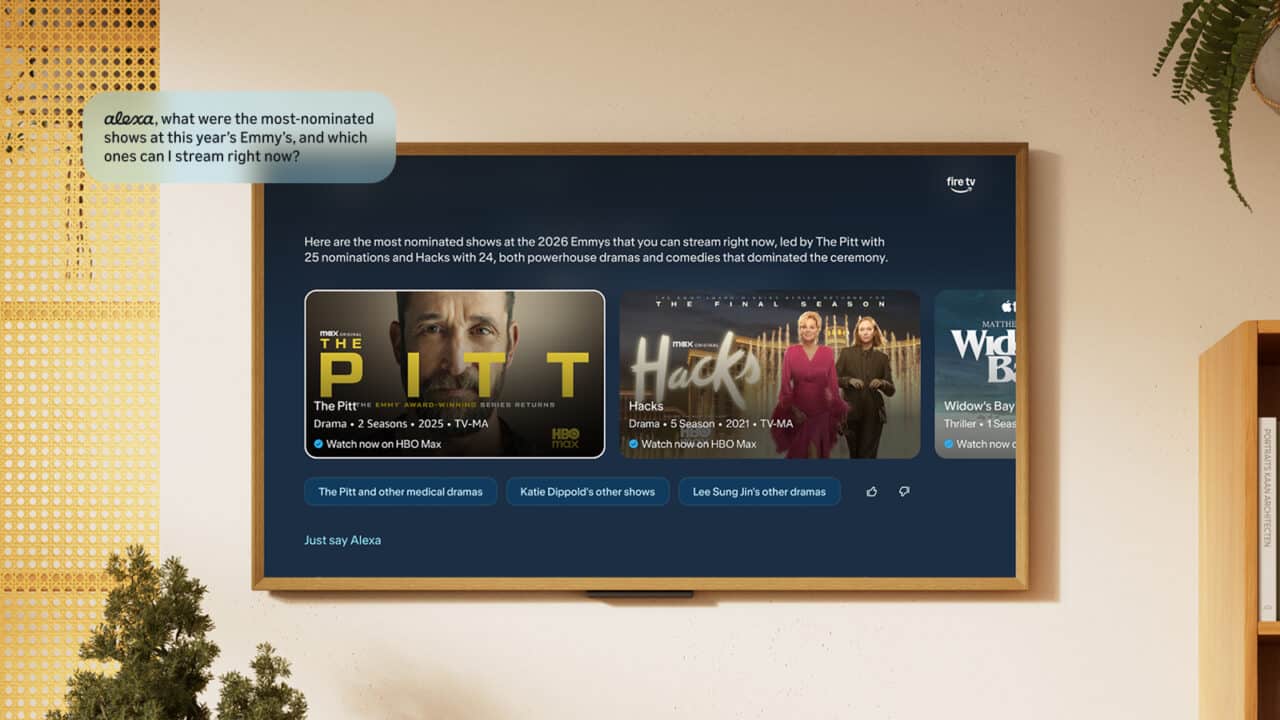
The biggest change you will notice is how you search for things to watch. Instead of saying a specific title, you can describe the mood or type of story you want, like “Recommend me a top-rated thriller” or “Show me historical dramas with strong female leads.” You can then refine that with simple follow-ups such as “something newer” or “with a female lead” without repeating the full request.
Alexa+ also pulls more of your viewing into one conversational flow. It remembers what you just asked and can keep the thread going, whether you are narrowing down a list of movies or asking for more information about an actor. On Fire TV, customers have already used Alexa+ to quickly find tens of millions of movies, shows, and sports content through these kinds of natural chats instead of endless scrolling.
Entertainment controls are getting smarter too. You can ask Alexa+ to move what you are watching on Prime Video from one Fire TV device to another in your home, for example by saying, “Alexa, move this show to the Fire TV in my bedroom.” You can also ask on-screen questions like, “Alexa, how many movies has Hilary Duff been in?” and then follow up with “Is she still on tour?” without switching to your phone or another screen.
Everyday things you can ask Alexa+ to handle
Day to day, Alexa+ on Fire TV is built to cut down on remote-clicking and juggling devices. You can describe what you are in the mood to watch, ask for suggestions by genre or vibe, or let it surface things you might not have found on your own. Many people are using it as an everyday assistant while they watch, asking for the weather forecast, recipe recommendations, sports scores, or setting timers, all hands-free.
For smart-home fans, Fire TV becomes a simple voice hub in your living room or bedroom. You can say, “Alexa, show the front door” to pull up a Ring camera feed directly on your TV. If you have compatible lights and scenes set up, a request like “Alexa, make it dimmer in here for a movie night” can adjust lighting and dim supported devices around you.
Alexa+ also works with paired smart locks and other smart home devices through your Fire TV. You can ask, “Alexa, lock the door” and Alexa+ will communicate with your paired smart lock while you stay on the couch. These kinds of quick, everyday requests have become some of the most popular ways people are using Alexa+ on Fire TV, turning the TV into more than just a screen for shows.
Which Fire TV devices and TVs get Alexa+
Alexa+ on Fire TV is rolling out in the U.S. to a wide range of devices people already have at home. That includes all current-generation Amazon Fire TV Sticks, so if your Fire TV Stick is one of the models Amazon currently sells and you use the Alexa voice button on your remote, you are in the group receiving the upgrade. The Fire TV Cube is also included, bringing the same conversational experience to Amazon’s more powerful streaming box.
On the TV side, Amazon Ember smart TVs are eligible, along with other smart TVs from trusted brands that have Alexa+ built in, including Hisense and Panasonic. These TVs already put Fire TV software and Alexa into the screen itself, and Alexa+ builds on that foundation with more natural conversations and better recommendations. Additional devices and regions may be added over time, but this rollout focuses on customers in the U.S.
How the rollout works on your existing setup
If you have an eligible Fire TV device in the U.S., the Alexa+ experience comes as an automatic upgrade. You do not need to change your Prime membership status, sign up for anything new, or install a separate app. A Prime membership or an Alexa+ Standard Plan subscription is still required for a few extras on top, including Alexa Routines, access to specific Ring camera moments, advanced Home Modes that automate household devices, and Alexa+ on compatible Echo devices. You just keep using your Fire TV the way you always have, and the assistant on the other side of the microphone becomes more conversational.
Once it is active, you trigger Alexa+ the same way you already talk to Alexa on Fire TV, using your voice remote or built-in TV microphone where available. From there, you can try out new kinds of questions, stack follow-ups, and see how it handles both finding something to watch and everyday tasks. For many people, the difference will show up first in how quickly they land on something they actually want to watch, without fighting through endless menus.
View the original press release.