The Phoscon ConBee II remains a solid, well-supported Zigbee coordinator for anyone with an existing Home Assistant or deCONZ setup. It’s stable, still gets regular firmware updates, and works cleanly with ZHA and Zigbee2MQTT too. If you’re starting a brand-new smart home build, though, the newer ConBee III is usually the better buy thanks to its updated radio and higher device capacity. Here’s why, and what the ConBee II still gets right.
| Pros | Cons |
|---|---|
| Universal Zigbee hub | No external antenna |
| Great for Home Assistant and other locally hosted smart home hubs | Not Google / Alexa / Apple compatible without workarounds |
| Frequent software updates | Web UI is limited |
| Just works |
Phoscon ConBee II Details
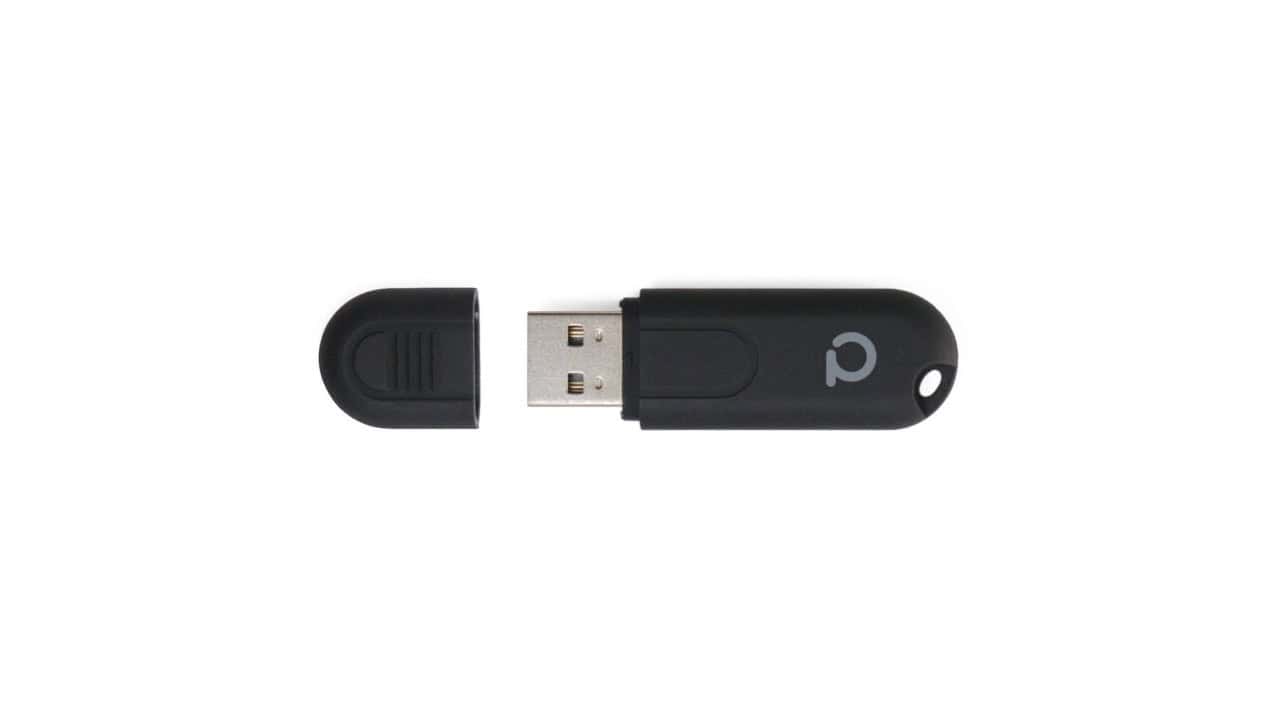
The Phoscon ConBee II is a powerful and versatile device that allows users to connect and control a wide range of smart home devices. With its sleek and compact design, the ConBee II is easy to install and works cleanly with popular smart home devices that use Zigbee. This handy little gadget acts as a bridge between your smart home devices and your smart home hub, giving you the ability to monitor and manage your entire smart home ecosystem from one central hub. The ConBee II is perfect for most locally hosted smart home hubs, including Home Assistant. Whether you’re controlling your lighting, adjusting your thermostat, or managing your security system, the Phoscon ConBee II puts the power of smart home automation right at your fingertips. It’s time to take control of your home and make your life easier with the Phoscon ConBee II.
ConBee II vs ConBee III: Which Should You Buy?
If you’re weighing a ConBee II against the newer ConBee III review, here’s the honest breakdown. The ConBee II runs on the older Atmel ATSAMR21B18 (ARM Cortex-M0+) radio platform. It’s still a well-supported, stable Zigbee 3.0 coordinator, but it’s built for smaller networks. The ConBee III moves to a Silicon Labs EFR32MG21 radio, which brings a big jump in device capacity (roughly 200 devices in a direct connection, extending to 500-600 with routers and a properly built-out mesh), plus shipping firmware for both Zigbee 3.0 and Zigbee Green Power. The newer chip also opens the door to a Thread/OpenThread Border Router firmware, currently positioned as a tech preview rather than a full replacement for Zigbee.
Bottom line: if you’ve already got a ConBee II running a modest Zigbee network, there’s no urgent reason to upgrade – keep it, or pick one up cheap. If you’re building a new smart home from scratch, or you know your network is going to grow, spend the extra money on the ConBee III instead, and check our tips for buying Zigbee devices before you start adding hardware.
ConBee II Specs at a Glance
| Spec | Detail |
|---|---|
| Chip | Atmel ATSAMR21B18 (ARM Cortex-M0+) |
| Form factor | USB stick, 60 mm x 18 mm x 9 mm |
| Transmit power | Max. 10 mW |
| Line-of-sight range | Up to 200 m (650 ft) outdoors; ~30 m (100 ft) indoors |
| Zigbee support | Zigbee 3.0 (IEEE 802.15.4) |
Specs per Phoscon’s official ConBee II tech spec page.
Phoscon ConBee II Review
I’ve had the Phoscon ConBee II running in my smart home for quite a while now. I use this piece of hardware to connect my main Home Assistant environment to all of my Zigbee devices. It’s the main Zigbee hub for my smart home. In general, this has been a reliable Zigbee hub that has worked with relatively few problems.
The one problem with this device is that the antenna is integrated into the USB body. Since the Zigbee protocol operates on the same frequency as some Wifi, this can cause interference. The solution to this is to use the dongle with a USB extension cord so you can move the dongle away from sources of Wifi traffic. Problem solved.
Other than the Wifi interference issue, this dongle has been solid. I have used it with both the installed hardware and with Docker containers, both running on a Raspbian OS. I have even hooked it up to a Windows 10 machine briefly, again no problems. Of the installation methods, I tend to prefer the Docker containers simply because it leaves my OS cleaner. That said, both the containers and the software worked perfectly for me.
Firmware Updates and Antenna Placement
The deCONZ app checks for firmware updates automatically and will prompt you when one’s available. That’s the easiest path if you’re already running deCONZ. If you’re not, Phoscon also offers a browser-based firmware updater, and power users can flash firmware directly with the command-line GCFFlasher tool that dresden elektronik maintains for exactly this purpose. Keeping the ConBee II’s firmware current is worth doing. It’s one of the reasons this dongle has stayed reliable for so long.
On the antenna interference mentioned above: beyond just using a USB extension cable, avoid plugging the ConBee II directly into a USB 3.0 port if you can help it. USB 3.0’s data lines generate noise in the 2.4 GHz band that Zigbee and Wi-Fi both use, which can degrade range and reliability. A cheap USB 2.0 hub or extension cable routed away from your router solves both problems at once.
FAQ
What is the Phoscon ConBee II?
The Phoscon ConBee II is a powerful and versatile Zigbee USB stick that acts as a gateway to connect various smart devices in your home. It is designed to work smoothly with popular smart home platforms like Home Assistant, allowing you to control and automate your smart lights, thermostats, sensors, and more. With the ConBee II, you can enjoy a centralized and user-friendly control over your smart home ecosystem, making it easier than ever to customize and manage your devices. This compact and easy-to-use USB stick is an ideal choice for both tech-savvy users and beginners looking to create a smart and connected home environment.
Does Phoscon ConBee II support Z-Wave?
No, the Phoscon ConBee II is only a Zigbee controller. This USB stick can connect to and control your Zigbee devices.
Can I connect the Phoscon ConBee II to Home Assistant?
Yes, you can definitely connect the Phoscon ConBee II to Home Assistant, and there are three supported paths. ZHA is now the most commonly recommended integration for ConBee sticks. It talks to the radio directly with no separate deCONZ software running. The original deCONZ integration still works if you’re already using the Phoscon app and gateway, though Nabu Casa now publishes an official deCONZ-to-ZHA migration guide for anyone switching over (make sure your ConBee II is running recent firmware before migrating). Zigbee2MQTT is the third option if you’d rather run your Zigbee network through MQTT instead of a native Home Assistant integration. Whichever you pick, plug in the USB dongle, open Settings, then Devices and Services, then Add Integration, and search for ZHA or deCONZ, or set up Zigbee2MQTT separately.
Is the Phoscon ConBee II compatible with ioBroker?
Yes, the Phoscon ConBee II is compatible with ioBroker. As a standard Zigbee 3.0 coordinator, it works with ioBroker’s Zigbee adapters and plays nicely with the major Zigbee brands: Philips Hue, IKEA TRADFRI, Aqara, and OSRAM SMART+, and most other standard Zigbee devices, giving you a smooth setup process. Whether you’re a beginner or an advanced user, the ConBee II’s compatibility with ioBroker opens up a world of possibilities for creating a smarter, more connected home.
Can I use Zigbee2MQTT with the Phoscon ConBee II?
Yes, you can definitely use Zigbee2MQTT with the Phoscon ConBee II. This combination offers a powerful and flexible solution for your smart home needs. The Phoscon ConBee II acts as a Zigbee gateway, allowing you to connect and control a wide range of Zigbee devices. Zigbee2MQTT, on the other hand, is a software that runs on compatible gateways and allows you to integrate Zigbee devices from different manufacturers into a single system. By using Zigbee2MQTT with the Phoscon ConBee II, you can easily manage and control your Zigbee devices using your preferred home automation software or platform. This combination gives you the freedom to choose the devices you want to use, while enjoying a smooth, unified smart home experience.
Can I control multiple Zigbee devices with the Phoscon ConBee II?
Yes, you can definitely control multiple Zigbee devices with the Phoscon ConBee II. This versatile USB stick acts as a gateway, allowing you to connect and manage a wide range of Zigbee devices from different manufacturers. Whether you have smart lights, sensors, or other Zigbee-enabled devices, the ConBee II offers broad compatibility. With the ConBee II, you can create and customize your own Zigbee network, allowing you to control and automate multiple devices simultaneously. Its extensive compatibility and user-friendly interface make it a great choice for anyone looking to centralize and simplify their smart home setup.
Is the Phoscon ConBee II easy to set up and use?
Yes, the Phoscon ConBee II is incredibly easy to set up and use. With its plug-and-play functionality, you can simply connect it to your computer or Raspberry Pi using the USB interface. The device is compatible with multiple operating systems, including Windows, macOS, and Linux, making it accessible to a wide range of users. Once connected, you can easily control and manage your Zigbee devices through the user-friendly Phoscon app, which makes connecting and automating your devices simple. Whether you’re a beginner or an experienced user, the ConBee II simplifies the process of creating a smart home ecosystem.
Is the ConBee II still worth buying in 2026?
For an existing Zigbee network, yes. It’s stable, keeps getting firmware updates, and there’s no reason to replace a working setup. For a brand-new build, we’d point you to the ConBee III instead; its newer radio handles larger networks more comfortably and it’s positioned for Thread as that rolls out.
Do I need special firmware to migrate from deCONZ to ZHA?
You need to be running a recent ConBee II firmware version before switching. Check Nabu Casa’s official deCONZ-to-ZHA migration guide for the current minimum and step-by-step instructions. If your firmware is out of date, update it through deCONZ or the Phoscon firmware updater first.
In Summary
Thank you so much for taking the time to read our review of the Phoscon ConBee II. We hope that this gave you a better understanding of this device and its capabilities. Whether you’re a smart home enthusiast looking to expand your system or a beginner getting started with home automation, the ConBee II offers a reliable and convenient solution. With its easy installation process, compatibility with numerous smart home devices, and user-friendly interface, the ConBee II is a game-changer.