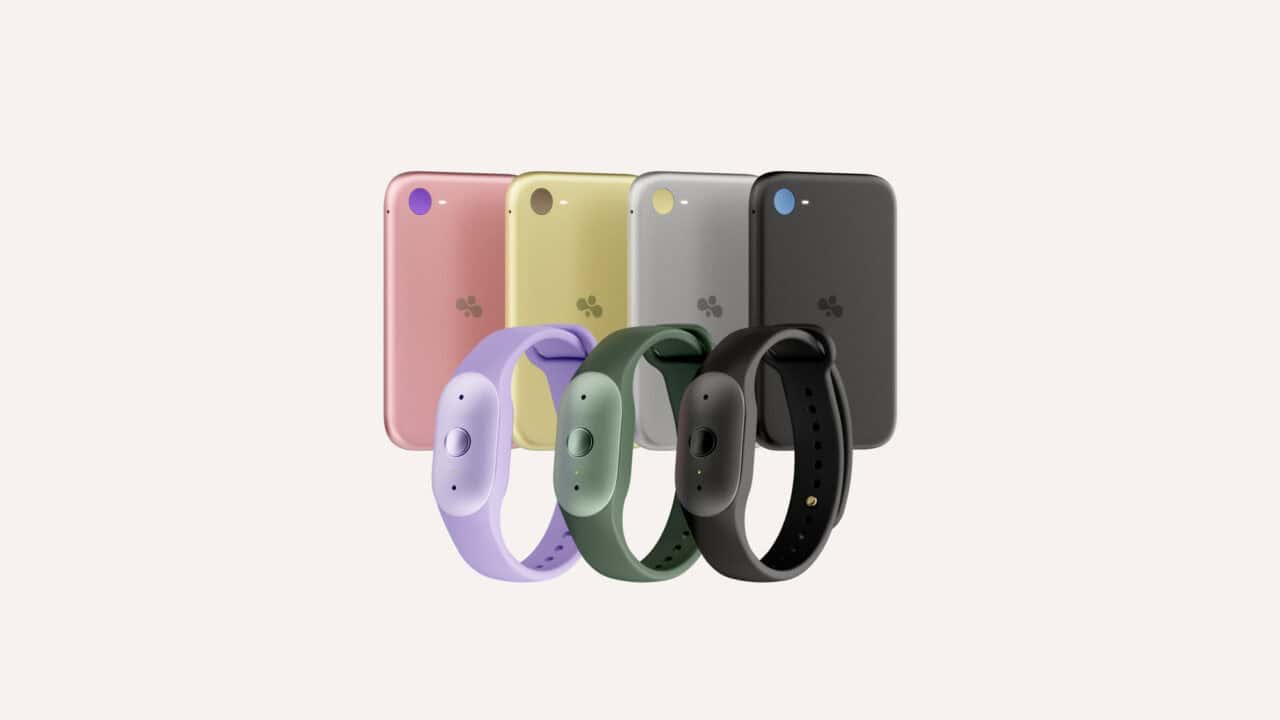
Amazon is launching two new AI wearables called Bee Frontier and Bee Eclipse, built to quietly listen to conversations you choose, then turn them into summaries and recaps. Pulling those up through Alexa+ takes a paid Bee Pro subscription. The devices come from Bee, an ambient AI company Amazon acquired, and are designed to sit in the background while you talk, meet, or take a call, then give you a clean record of what happened without you needing to type notes. Both products lean heavily on privacy controls, encryption keys that only your device controls, and clear indicators for when they are on and listening. Bee Pro also unlocks the Amazon.com shopping connection and other extras, and new customers get a 30-day free trial.
Bee Frontier: Wrist or Clip Wearable Focused on Everyday Conversations
Bee Frontier is a small, lightweight wearable you can either strap to your wrist or clip to your clothing, aimed at in-person conversations, walking meetings, and daily life moments you do not want to forget. It ships with an ultra-soft silicone band for wrist wear and can also attach directly to fabric, so you can pick what feels more natural. The device comes in three colors (Lavender, Sage, and Onyx) with a design that stays out of the way while it listens in on the conversations you choose to capture.
On the hardware side, Bee Frontier is rated IP67, which means it is built to handle dust and brief exposure to water, and it charges over USB-C for quick top-ups with a standard cable. Amazon states that Frontier can run for up to seven days on a single charge, aimed at getting through a workweek without needing daily charging. Dual microphones with advanced noise filtering are built in to help Bee ignore irrelevant sound in noisy places, and you can set the device to turn itself off after a stretch with no sound, such as 5 or 15 minutes, to save battery and reduce unnecessary listening. You turn Bee Frontier on or off with a single press, and an LED shows when it is active so you have a visible cue that it is listening.
Bee Frontier is already available on Amazon.com, so people who want to try this style of ambient note-taking can order it right away. Once set up with the Bee app, it listens when you activate it and then sends conversations into Bee’s system to be converted into summaries and recaps. Those core features and a 14-day memory window come included with the device without extra cost, as long as you stay within that basic feature set.
Bee Eclipse: Magnetic Phone Companion with Long Battery and Call Prompts
Bee Eclipse takes a different form: it is a slim, credit-card-sized device that snaps magnetically to the back of your phone. This design is meant for people who do a lot of talking on their phone and want Bee to ride along with them without needing a separate clip or wristband. Eclipse comes in four finishes (Silver, Midnight, Honey, and Blush), giving a few aesthetic choices for matching your phone or case.
Battery life is a major point for Bee Eclipse, with Amazon saying it can run for more than 21 days on a single charge. That long runtime makes it a set-and-forget accessory once you attach it to your phone and charge it on a regular schedule. When Eclipse records a phone call, it prompts you to get permission from the other person or people each time a recording starts, so everyone on the call knows what is happening. As with Bee Frontier, a single press turns the device on or off, and an LED light shows clearly when it is on.
Amazon says Bee Eclipse will be available soon on Amazon.com, without a specific date or preorder window. That means Bee Frontier is the only Bee hardware that you can buy right away, with Eclipse positioned as the option for people who want a more phone-centric experience when it does launch. Once available, Eclipse will feed conversations into the same Bee system as Frontier, so the way you get summaries and recaps will be similar, just wrapped around calls and phone-based conversations.
How Bee Connects to Alexa+ and Amazon.com
The connection to Alexa+ is where Bee starts to feel more like part of Amazon’s wider ecosystem. Once you connect your Bee account to Alexa+, you can ask Alexa, hands-free, for a meeting summary, check your to-dos, or pull up something a friend mentioned, such as a book recommendation from a recent chat. This works across Echo devices with voice ID turned on, so Alexa can recognize who is speaking and pull that person’s own Bee summaries and insights, not someone else’s.
Beyond voice access, Bee also connects to your Amazon.com account. When that is turned on, products that you talked about in your conversations can show up as recommendations on your Amazon homepage and inside the Bee apps. The idea is to bridge what you say in your daily life with what you might want to buy later, without needing to remember brand names or exact product titles. Both connections, though, sit behind the Bee Pro subscription, so they are not part of the free tier that comes with just buying the device.
It is worth knowing what that shopping connection does with your conversations. Amazon says Bee can surface items you mention as product recommendations on your Amazon homepage. Bee’s terms say that once you connect an Amazon service, the transcripts and summaries you send leave Bee’s Private Compute Environment and fall under the Amazon.com Privacy Notice.
That is the same notice under which Amazon uses personal information for recommendations and interest-based ads, though it says it doesn’t use information that personally identifies you to show those ads. Neither Bee’s announcement nor its terms says conversation data is kept out of ad targeting. The connection is opt-in and you can disconnect it in the Bee app at any time, but the terms note that Amazon can’t recall data that has already been sent.
Bee Pro is also required for a few deeper features that work across Bee Frontier and Bee Eclipse. With Bee Pro, you unlock unlimited recent summaries instead of being limited to a 14-day memory window, along with connections to third-party apps, suggested to-dos based on your conversations, daily memories, a personal chat assistant for talking to your conversation history, and templates for common types of conversations like recurring meetings. A desktop app for working with Bee on a computer also requires Bee Pro. New customers get a 30-day free trial of Bee Pro.
What You Get Free and What Needs Bee Pro
Out of the box, both Bee Frontier and Bee Eclipse give you core conversation tools at no extra cost beyond buying the hardware. That free tier covers conversation summaries and recaps, along with storage of those insights for 14 days. During that time window, you can review your summaries and recaps without paying for a subscription.
If you want deeper features, Bee Pro is where most of the extras live. Bee Pro unlocks unlimited recent summaries so you are not limited to two weeks of memory, as well as connections to third-party apps. It also adds suggested to-dos that Bee creates for you based on what you talked about, daily memories that surface notable moments from your conversations, and a personal chat assistant that lets you ask questions and get answers based on your past conversations. Conversation templates and a desktop app are also part of Bee Pro, which makes Bee more of a daily work and life tool than just a recording companion.
Alexa+ and Amazon.com features sit firmly in the Bee Pro bucket. You need Bee Pro to ask Alexa for Bee summaries or to-dos, and to let Echo devices answer those questions based on your personal conversations. The product recommendation link between Bee and Amazon.com also requires Bee Pro, so product mentions from your conversations only show up on your Amazon homepage if you are in the paid tier. The base hardware works without Bee Pro, but the deeper Alexa+ and shopping connections do not.
Privacy, Security, and Control Features
Bee’s design puts a lot of attention on what happens to your audio and conversation data. Amazon says Bee processes conversations in an isolated environment called Bee Private Compute, which it describes as locked off so no one, including Amazon, can access it directly. As Bee listens, it turns your speech into insights like summaries and to-dos in real time, then deletes the raw audio instead of keeping it. Amazon states that no audio is ever stored, so what remains after processing are transcripts and higher-level insights, not the original sound. If you set up a voice profile or name a speaker in a transcript, Bee also keeps a voice model of that person inside the same private environment, and Amazon separately collects account and usage data to run the service.
Those transcripts are encrypted using keys that your device creates and controls, so the security model centers around your own Bee hardware. Both Bee Frontier and Bee Eclipse have a simple one-press on/off control and a visible LED, so you can see at a glance when they are listening. Bee Frontier also has an optional auto-off setting for when it does not hear sound for a while. Inside the Bee apps, you can delete transcripts and summaries any time you want, so you are not locked into keeping anything that you only needed for a short period.
The call recording behavior on Bee Eclipse carries an added layer of consent, with a prompt reminding you to get permission from other call participants each time a recording starts. That design is meant to keep everyone on the call aware when Bee is active, instead of turning it into a silent recorder. Between the hardware controls, LED status lights, on-device key handling, and real-time audio deletion, Bee’s approach is focused on giving people several ways to stay aware of when they are being recorded and what happens to that data afterward.
What You Need to Use Bee with Alexa+
To get started with Bee at the most basic level, you need one of the devices, either Bee Frontier or Bee Eclipse, along with the Bee app to pair, configure, and review your summaries. The hardware and the app together give you conversation summaries, recaps, and 14-day memory without any subscription. If you want voice access through Alexa+, you also need a Bee Pro subscription, since Bee Pro is what lets Alexa pull from your Bee data.
On the Alexa side, you need an Alexa+ account and an Echo device that can use voice ID, so Alexa can tell one person from another in the same home. That voice ID setup lets Bee respond with the right person’s summaries and to-dos instead of mixing multiple people’s data. With a Bee device, the Bee app, Bee Pro, Alexa+, and an Echo in place, you can ask Alexa for your meeting notes, to-dos, and reminders drawn from the conversations Bee has captured on your wrist, on your clothes, or on the back of your phone.
View the original press release.