Amazon’s new Echo Time is a small smart alarm clock built for the nightstand, with a focus on sleep, simple controls, and no camera. The device pairs a 3.2‑inch circular touchscreen with Alexa+, uses sensors to detect when you are in lighter sleep, and tries to ease you into and out of bed with gradual light, sound, and routines. It comes in several colors, earns a seal from a major sleep organization, and includes a separate kids version with its own designs and content.
A camera-free smart alarm clock for your nightstand
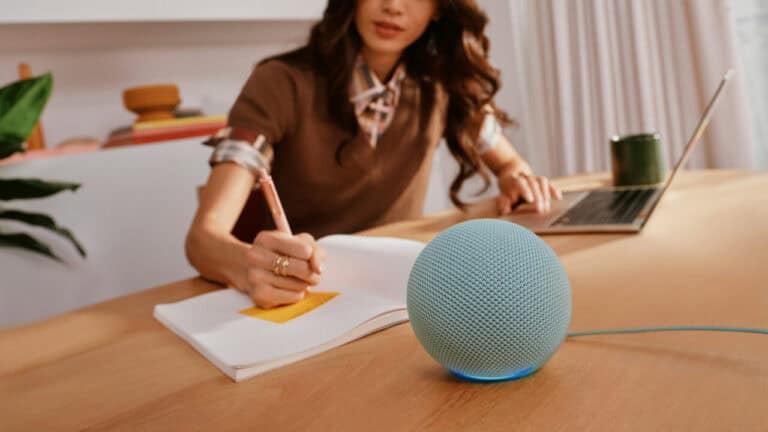
Echo Time is designed as a bedside smart alarm clock that you talk to rather than tap, and it does that without any built-in camera. The device uses Alexa+, the newer version of Amazon’s voice assistant, so you can ask it to set alarms, change the display, or start bedtime routines without touching the screen. The housing is spherical, with a 3.2‑inch circular touchscreen on the front, sized to sit on a nightstand instead of a TV stand or kitchen counter.
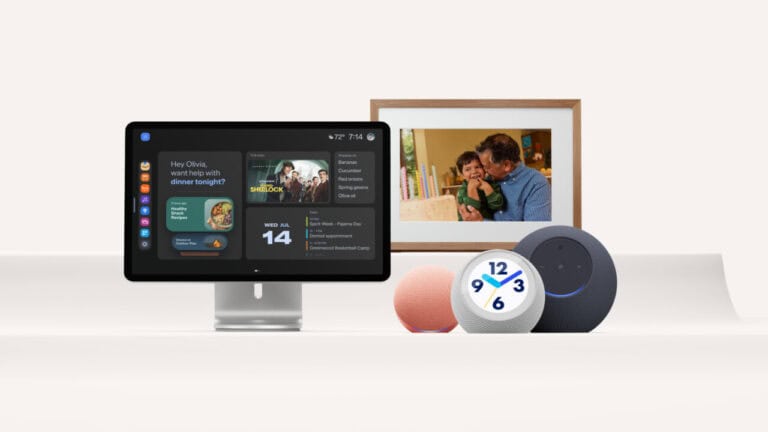
The main body comes in three colors: Graphite, Glacier White, and Coral Pink. A matching adjustable stand is sold separately. The design leaves out a camera on purpose, which will appeal to anyone uncomfortable with being filmed in the bedroom but still wanting a smart display by the bed.
Custom clock faces controlled with your voice
Echo Time is meant to feel like a regular clock at first glance, but the digital face can be switched among hundreds of different designs. Amazon is offering analog-style clock faces, nature backdrops, seasonal themes, sports team designs, and character artwork. Licensed characters mentioned include Harry Potter, Batman, Superman, Wonder Woman, Green Lantern, and the Powerpuff Girls.
You do not have to dig through menus to change the look. You can swap clock faces with voice commands like “Alexa, change to a seasonal clock face.” That approach fits the nightstand use case, since you might be in bed and not want to tap through screens in the dark just to change the style.
Alexa+ routines to handle mornings and bedtimes
Echo Time leans on Alexa+ routines so you can give it a simple request and let it handle the details. You can tell Alexa when you need to be ready and what you need to remember, and the assistant will set both an alarm and a reminder around that time. Amazon’s example: tell Alexa you need to be ready by 8 a.m. and can’t forget to grab your lunch, and it sets the alarm for the right time and queues up a reminder.
At night, Alexa+ can turn Echo Time into a wind‑down tool, not just a morning alarm. When you are ready for bed, you can ask Alexa to play relaxing music, and it picks a playlist from your preferred music service, or have it set the room to a sleep‑friendly temperature. Those routines aim to take some of the small decisions out of your bedtime and morning so you do not have to juggle separate timers, reminders, and app controls.
Smart alarms and Omnisense sleep sensing
One of the main sleep-related features is an optional “smart alarm” mode that tries to wake you during lighter sleep. When turned on, Alexa can wake you at any point within 10 to 60 minutes of your set alarm time, based on signals it detects that suggest you are not in deep sleep. The goal is to avoid that jarring feeling of waking up from deep sleep right at the set alarm minute.
To do this, Echo Time uses what Amazon calls Omnisense sensor fusion. Inside, it combines room temperature sensors and presence detection with ultrasound sensing. Ultrasound is used to detect breathing patterns and how close you are, without needing you to wear a watch or sleep tracker. Traditional alarm features are still there, with tones that start quietly and get louder with each snooze, up to four snoozes, for people who tend to ignore the first ring.
Sunrise-style lighting and a night-friendly display
Echo Time’s screen is part information display and part light source. As your alarm time approaches, the display slowly brightens to mimic a sunrise, which can help you wake up more gradually compared with a sudden blast of sound in a dark room. This visual cue pairs with the smart alarm window and the rising volume tones to create a layered wake‑up sequence.
At night, the device shifts to a low‑impact mode aimed at reducing distractions. The display dims and can switch to a minimal view that shows only the time or the next alarm. It also reduces blue light, which can be harsh in a dark room and may keep some people more alert when they are trying to fall asleep. The combination of dimming, simpler visuals, and reduced blue tones is meant to make Echo Time feel less like a bright mini‑TV and more like a regular bedside clock after lights out.
Echo Time has earned the National Sleep Foundation’s SleepMark, a label for products that meet certain evidence-based sleep health standards. That puts it in a category of sleep tools reviewed by a third‑party sleep organization, which may matter to people who want more than just a basic alarm.
A kids version with Cosmic Lime and Galactic Grape
Amazon is also releasing Amazon Kids Echo Time, a version aimed at children and families. This model comes in two kid‑focused designs, Galactic Grape and Cosmic Lime, with a look that is more playful than the main Graphite, Glacier White, and Coral Pink options. It includes a one‑year subscription to Amazon Kids+, the company’s content service for children.
Kids can use their Echo Time to set their own alarms, check the weather before school, and use Sleep Studio content that helps them wind down. The Sleep Studio content comes from Calm, Headspace, and Moshi, three brands known for relaxation and kid‑friendly bedtime stories and sounds. Parents keep control from the Amazon Parent Dashboard, where they can set sleep schedules so wind-down starts automatically at bedtime.
Privacy controls and opt-in sleep sensing
Because Echo Time sits in the bedroom and uses sensors for sleep, Amazon is calling out several privacy features. The device uses visual indicators to show when Alexa is listening, so you are not left guessing if your voice is being picked up. There is also a physical privacy button that shuts off the microphones completely, turning Echo Time into a basic clock with no listening.
Sleep sensing through Omnisense is not turned on by default and is opt‑in. You can turn sleep sensing on or off at any time in the Alexa app, and pressing the mute button to turn off the microphones also stops it. Those controls are meant for people who want the smart alarm and sleep‑aware features but still want clear ways to shut everything off when they prefer more privacy. Echo Time is available now for anyone who wants a camera‑free smart alarm clock that leans on Alexa+ for both mornings and nights, and certain features are tied to Alexa+ access, which Amazon says is included with a Prime membership.
View the original press release.