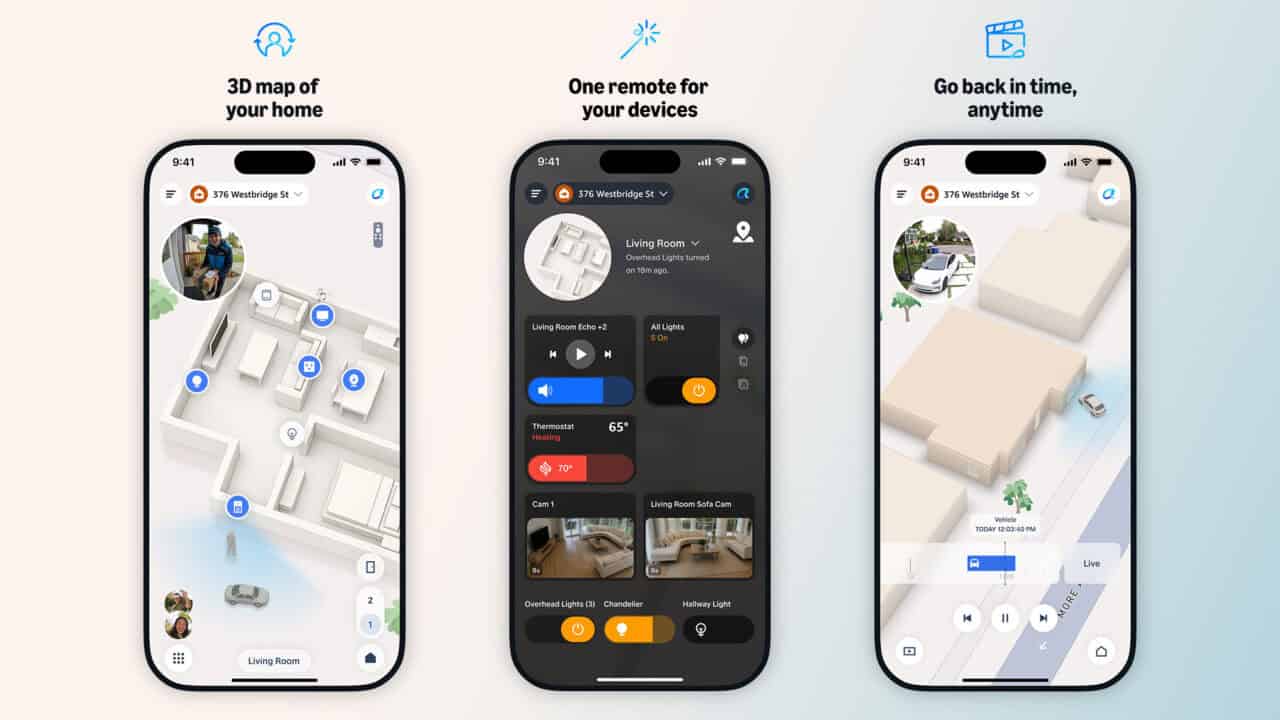
Alexa Home Map is a new way to see and control your smart home, and it will start rolling out in preview later this year. Instead of scrolling through long device lists, you get an interactive 3D map of your home and yard that shows where your Echo speakers, Ring and Blink cameras, Fire TV devices, lights, locks, thermostats, and other connected gear actually sit. You can tap on the map to do common actions like turning lights off, lowering the music volume, or checking a security camera. The goal is to make it easier to manage a growing number of smart devices by tying everything to a visual layout of your real space.
A 3D smart home you can see and control
Alexa Home Map is built around a 3D model of your home and property that you view from above and from room level. Each supported device appears on the map in its real location, so you can tap a lamp icon in the bedroom to control that specific light or spot the TV in the living room right where it sits. The experience covers the outside of your home too, including Ring cameras and other compatible devices placed around your yard, driveway, and entry points. Everyone in the household can use the map on shared Echo devices and Fire TV, so it is not tied to one person’s phone once it is set up.
Controls are built right into the map so you do not have to jump in and out of different screens. Amazon describes the map controls as core device functions, like the light, music, and camera actions mentioned above. You can also move your focus from one room to another by zooming in or switching floors. Security gear sits alongside entertainment and comfort devices, so checking on a camera or seeing where your locks are happens in the same visual space as the lights.
Live status and animated details
Alexa Home Map is designed to show you what is happening at a glance, not just give you static icons. Smart lights on the map glow in their actual color and brightness, so you can see which ones are left on or set to a certain mood. If music is playing on a speaker, you see music notes floating above it on the map, signaling which room is active. Even the virtual sky above your property shifts from day to night, and the weather in the scene matches the forecast.
You can move through the map in several ways to get the right view. Zooming into a specific room lets you focus on the devices inside that space, while floor controls let you switch between levels in multi‑story homes. For people who prefer a certain visual style, there are light and dark modes. Filters let you narrow the view to a single device type, such as only cameras when you want a quick security check or only lights when you are getting ready for bed.
How setup works, from outside to inside
Getting Alexa Home Map ready starts with your home’s address. Once you enter that, the exterior of your property appears automatically, giving you an immediate sense of how the system sees your lot and structure. From there, you walk through your home with a compatible iPhone and scan each room so the interior layout can be built in 3D. This room‑by‑room pass is what lets the map match walls, doors, and spaces to where you actually live, instead of using a generic floor plan.
After the interior is captured, you place your devices on the map. That means assigning each Echo, light, thermostat, lock, camera, or TV to its real‑world spot, like a nightstand, hallway, or patio. Because the map is tied to geography, the benefit grows as you add more gear to your smart home. Over time, you end up with a single visual place where everything from climate control to outdoor security comes together.
Ring features and 360‑degree security views
For homes with Ring cameras and services, Alexa Home Map pulls in a wide‑angle look at what is going on outside. One of the main pieces is a 360‑degree aerial view of your property, which lets you check the entire perimeter in one place. With compatible Ring cameras, you can see live animations of people and cars as they move outside, so the map is not just static icons but a live scene. When someone you have added to Familiar Faces comes to the door, the map tells you, so you know who it is. Familiar Faces is an opt-in Ring feature. Ring says face profiles are encrypted and stored in the cloud rather than on your cameras, unnamed profiles are removed after 30 days without recognition, and the feature is not offered in Illinois, Texas, or Portland, Oregon.
The security experience also includes ways to quickly review what happened earlier. When a Ring camera detects movement, a small live preview appears on the map in the camera’s location, and you can tap any camera on the map to pull up Live View. On top of that, an interactive timeline lets you rewind the last 24 hours from every camera at once. That unified playback can make it easier to piece together how something unfolded across multiple angles, instead of scrubbing through each camera separately.
Where you can use Alexa Home Map
Alexa Home Map is not limited to one screen or one kind of device. You will be able to use it through the Alexa Home Map app on iOS, inside the Alexa app, and inside the Ring app. It is also designed for larger Alexa screens, including bigger Echo Show devices such as the new Echo Show 16, so you can stand in the kitchen and glance at your whole home. On the TV side, Amazon Ember Artline with Fire TV can show the map on your wall, and the new Alexa Tablets can bring the same 3D layout to a handheld screen.
Some features and device types will depend on subscriptions. Amazon states that certain features and availability on Echo Show, Fire TV, and Alexa Tablets require Alexa+, which is included with a Prime membership. For certain other Alexa Home Map features, a Ring Protect Pro or Virtual Security Guard subscription is needed with compatible Ring cameras. The company is not breaking down exactly which specific functions tie to which plan, but the overall message is that the full experience links together Alexa+, Ring services, and the new 3D map.
What you need
To get started with Alexa Home Map once the preview rolls out, you need a few basics. First, you need a compatible iPhone to scan each room and build the 3D interior of your home. You also need one or more of the supported screens or apps where the map will appear, such as the Alexa Home Map app on iOS, the Alexa and Ring apps, larger Echo Show devices including Echo Show 16, Amazon Ember Artline with Fire TV, or the new Alexa Tablets.
Beyond hardware and apps, some parts of the experience depend on subscriptions. Alexa+ is required for certain features and availability on Echo Show devices, Fire TV, and Alexa Tablets. For some of the Ring‑related features inside the map, you need a Ring Protect Pro or Virtual Security Guard plan with compatible Ring cameras. With those pieces in place, Alexa Home Map is designed to turn a scattered set of smart home gadgets into a single visual picture of your space, from the street to the back yard.
View the original press release.