These six routine-building tricks turn Alexa, Google Home, and SmartThings from “set a timer” gadgets into actual helpers that run parts of your day on their own. With simple patterns like a motion + sunrise morning scene or an away-mode that fakes someone being home, you can set everything up in about five minutes per routine and stop feeling like you’re wasting your smart-home gear. Keep reading to learn how to make your voice assistant feel a lot less dumb.
Build a Morning Routine That Starts With Time, Motion, and Sunrise
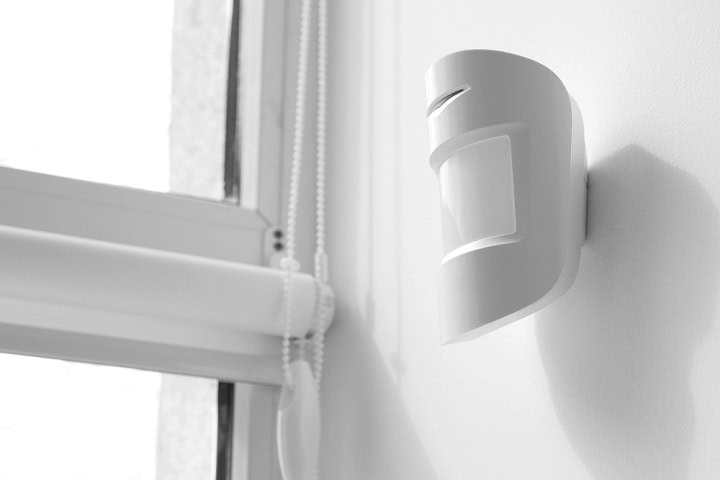
A “time + motion + sunrise” routine turns your Echo or Nest Hub from a talking alarm clock into something that quietly spins up your whole morning. Set a time-of-day condition (for example, not before 5:30 a.m.) in the Alexa or Google Home app, then add a motion trigger from a hallway or bedroom sensor, and cap it with a sunrise condition pulled from your location. Once all three line up, your bedroom Hue lights fade up to 30%, a Sonos or Nest Audio plays a calm playlist at volume 3, and a smart plug on your coffee maker kicks on. It takes about five minutes to build in the routine editor, and saves you several tiny decisions every single morning, which adds up to hours of mental energy back over a month.
Set an Away Mode That Does More Than Turn the Lights Off
Set an Away Mode that does more than turn the lights off by tying your Echo, Nest Hub, or SmartThings hub to a “no one’s home” status instead of just a schedule. In Alexa, for example, you can trigger an Away routine when your phone leaves a geofence around home, or in Google Home use Household routines with Home & Away mode, then shut off all Hue lights, lower a Nest thermostat to 65°F, arm a Ring or SimpliSafe system to Home, and pause any Echo Multi-Room Music.You can get fancier by adding a few smart plugs and a smart lock, so the same routine can power down your TV and office gear, lock the front door, and switch one or two interior lights to Hue’s built-in Mimic Presence scene (or your hub’s Vacation Mode) after dark to fake presence. Building this once takes about 5 minutes in the Alexa or Google Home app and easily saves you 30 seconds of “did I lock the door, did I turn that off” panic every single time you leave.
Use One Command to Broadcast Across the Whole House

Use one voice command to blast a message through every Echo or Nest speaker so you stop yelling “Dinner’s ready!” down the hallway. On Alexa, you build a routine with an Announcement action that plays on all of your Echo devices, triggered by a phrase like “Alexa, it’s dinner time,” which can also turn off the TV and dim Hue lights in the dining room. On Google Home or Nest, you set up a routine with a custom starter phrase and a “Broadcast” action that plays on every speaker or display in the house. Spend 5 minutes setting this up once, and you save those same 5 minutes every night you’re not walking up and down the stairs acting like a human intercom.
Make Bedtime Routines Adjust to Who’s Actually Home

A context-aware bedtime routine can change based on who is actually home instead of blasting “good night” to every room. On Alexa, you can build a “Goodnight” routine that triggers either from a voice phrase or at 11:00 p.m., then adds conditions like “if my phone is at home” or “if the bedroom motion sensor is still reporting presence.” That lets you do things like turn off Hue lights only in occupied rooms, lower the thermostat 2 degrees if both phones are home, and leave the hallway nightlight on until 6 a.m. It takes about 5 minutes to set up and saves you from walking the house for 2–3 minutes every night, so it pays for itself in a couple of days.
Trigger a Guest Arrival Greeting the Moment Someone Walks In

A “guest arrival” routine uses a front-door sensor or camera to trigger a friendly greeting the second someone walks in. You pair a contact sensor on your front door (like an Aqara or Ring sensor) with an automation in Alexa, Google Home, or SmartThings — or for a Nest Doorbell specifically, use a motion-event trigger in a Google Home routine — then have it play a custom message on an Echo or Nest Hub in the entryway. Mine literally says, “Hey, welcome in, shoes go on the mat, bathroom’s on the left,” and flips on the hallway Hue lights to 60% so people aren’t walking into a cave.Setup is under 5 minutes once the sensor is added to your system: pick the door sensor as the trigger, set it to run only between, say, 5 p.m. and 11 p.m., then add actions like “announce” on all speakers, turn on entry lights, and maybe pause the TV so you hear the door. The time-payback is quick; even if this saves you 20 seconds of yelling directions every time someone visits, it pays for itself in a week if you host friends or deliveries a few times.
Automate Your Shades Based on the Weather Before the Room Heats Up

Automating your smart shades based on the weather keeps your room from turning into a 78°F oven before you even notice it warming up. Instead of just shouting at Alexa or Google Assistant to close the blinds when the sun is already blasting in, you set a routine driven by an outdoor temperature sensor (an Aqara, Eve Weather, or Ecowitt sensor connected to your SmartThings or Home Assistant hub works well) and the time of day. For example, you can have a routine that fires when the outdoor sensor reads above 80°F after 10 a.m., then auto-closes your IKEA FYRTUR or Lutron Serena shades on east-facing windows as soon as the sun hits them. You spend 5 minutes building that routine once, then save yourself fiddling with blinds every sunny day for years, which adds up to hours of tiny annoyances you never have to deal with again.
Summary
The single most important thing to remember is that voice assistants feel smart when you stop asking and start letting routines run your day by themselves. Pick one area that annoys you the most right now, like yelling for kids at dinner or wondering if you locked the door, and build just that single routine first. Once you see that five minutes of setup really does save you time and mental energy every day, come back and add a second and third routine. Over a few weeks, your Alexa, Google Home, or SmartThings hub will quietly handle a lot of the boring stuff in the background.